• Home
  • Blog
  • Prices
  • Tutorials
  • Contact
  • FREE 30-DAY TRIAL
  • Ukrainian
  • English
  • Home
  • Blog
  • Prices
  • Tutorials
  • Contact
  • FREE 30-DAY TRIAL
  • Ukrainian
  • English

Labels

  • Saturday September 29, 2018
  • Karol Wojtyla
  • Surveys
September 29, 2018Kiely John

This is where we add the names and descriptions for our surveys.

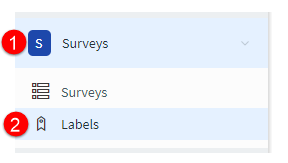
  1. Go to Surveys.
  2. Go to Labels.survey labels
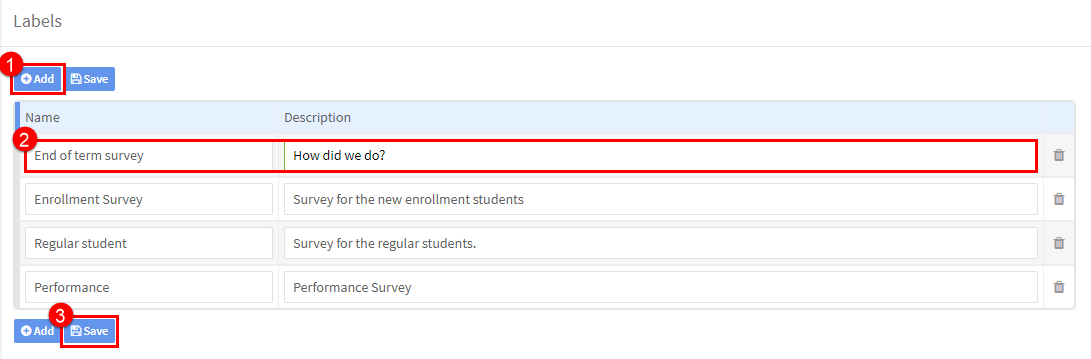
  1. Click Add.
  2. Put the name of the survey and a description.
  3. Click Save.

MOST POPULAR ARTICLES

  • Back to Main Tutorials Menu

    How to…Surveys

    • Finance 1
    • Accommodation Part 1
    • Reports
    • Teacher & Student User Guides
    • Main Page 1
    • Teacher User Guide 1
    • School Admin
    • Accommodation Part 2
    • Finance 2
    • Teacher User Guide 2
    • Main Page 2
    • Finance
    • Student User Guide 1
    • How to.........1
    • Settlements 1
    • Settlements 2
    • CRM Module
    • How to ..........2
    • Student User Guide 2
    • Registration
    • Getting Started FAQs 1
    • School Admin - Groups Part 1
    • Payments 1
    • Study Drive
    • Payments 2
    • School Admin - Groups Part 2
    • Finance FAQS 1
    • Reports
    • School Admin - Students 1
    • Resources
    • Finance FAQS 2
    • School Admin - Students 2
    • Teachers 1
    • Academics
    • Teachers 2
    • Surveys
    • Companies 1
    • Online Payments
    • Companies 2
    • Accommodation
    • Settings 1
    • Settings 2
    • Other School Admin Menu Items 1
    • Other School Admin Menu Items 2
    • Tips & Tricks 1
    • Tips & Tricks 2
    • School Admin FAQs 1
    • School Admin FAQs 2

    Latest Articles

    • Telegram BOT Setup Guide
    • How to Generate Time Tracking Records
    • How can I send a reminder about a payment?
    • Students cancelling lessons
    • Transfers Import – XML file
    • Quick links

      • Home
      • Blog
      • Prices
      • Tutorials
      • Contact
      • FREE 30-DAY TRIAL
      • Ukrainian
      • English
    • Blog

      • Bulk Messaging using Telegram/Viber/Whatsapp for Language Schools April 14, 2026
      • How to Use Instagram to Promote Your Language School January 16, 2026
    • contact

      SchoolMate S.L. Calle Fuencarral 139, 2C, Madrid, 28010, España.
      info@schoolmate.eu
      +34 689337225
    © 2026 All rights reserved.